AI Agents for Business: How We Automated 40 Hours of Work
Learn how you can use AI agents to save time and resources while improving business outcomes.
I started using AI the same way most people do. Purchased the "pro versions" of a bunch of tools to help me get more productive with my work.
And sure, it helped, just not in the way I expected. My work felt fragmented, and I still found myself jumping between tools, setting follow-up reminders, and double-checking outputs.
But things changed when I stopped using the tools separately and started connecting them.
I set up a cold email agent to automate outreach with personalized emails and follow up with a 5-day sequence. Once everything was set in motion, I could finally relax and focus on other aspects of building my business.
Do this as a large enterprise, and you can save weeks of time and effort.
Scroll ahead if you'd like to learn more about how you can use AI agents for your business like me.
What is an AI agent for business
An AI agent is intelligent software that takes action on your team's behalf, not just answers questions. While a traditional chatbot waits for instructions and gives basic responses, an AI agent understands goals, makes decisions, and carries out multi-step tasks across the tools your business already uses.
In a business setting, AI agents are handy because they are:
Autonomous: They complete tasks independently. Once given a goal, they navigate workflows, retrieve information, and finish work without constant supervision.
Purpose-driven: Instead of reacting to one question at a time, they operate with clear objectives, like generating reports, updating CRM entries, or summarizing customer feedback.
Deeply connected: They plug into your existing systems, data sources, and software so they can work with real operational information, not just what you type into a chat window.
How AI agents work
AI agents operate in a simple loop. They observe their environment, make decisions, take action, and learn from results to improve over time.
Perception and Data Input: AI agents gather information from connected systems like documents, databases, Slack messages, and emails. This context helps them understand what needs to be done.
Reasoning and Decision Making: Once they have data, agents use AI models to interpret it, understand user intent, and determine the most effective action.
Action and Task Execution: After deciding on an action, agents execute it. They send messages, update CRM records, generate documents, or trigger workflows in other applications.
Learning and Improvement: AI agents analyze feedback and usage patterns to improve accuracy, efficiency, and decision quality over time.
What Tasks Can AI Agents Automate
Answering repetitive questions
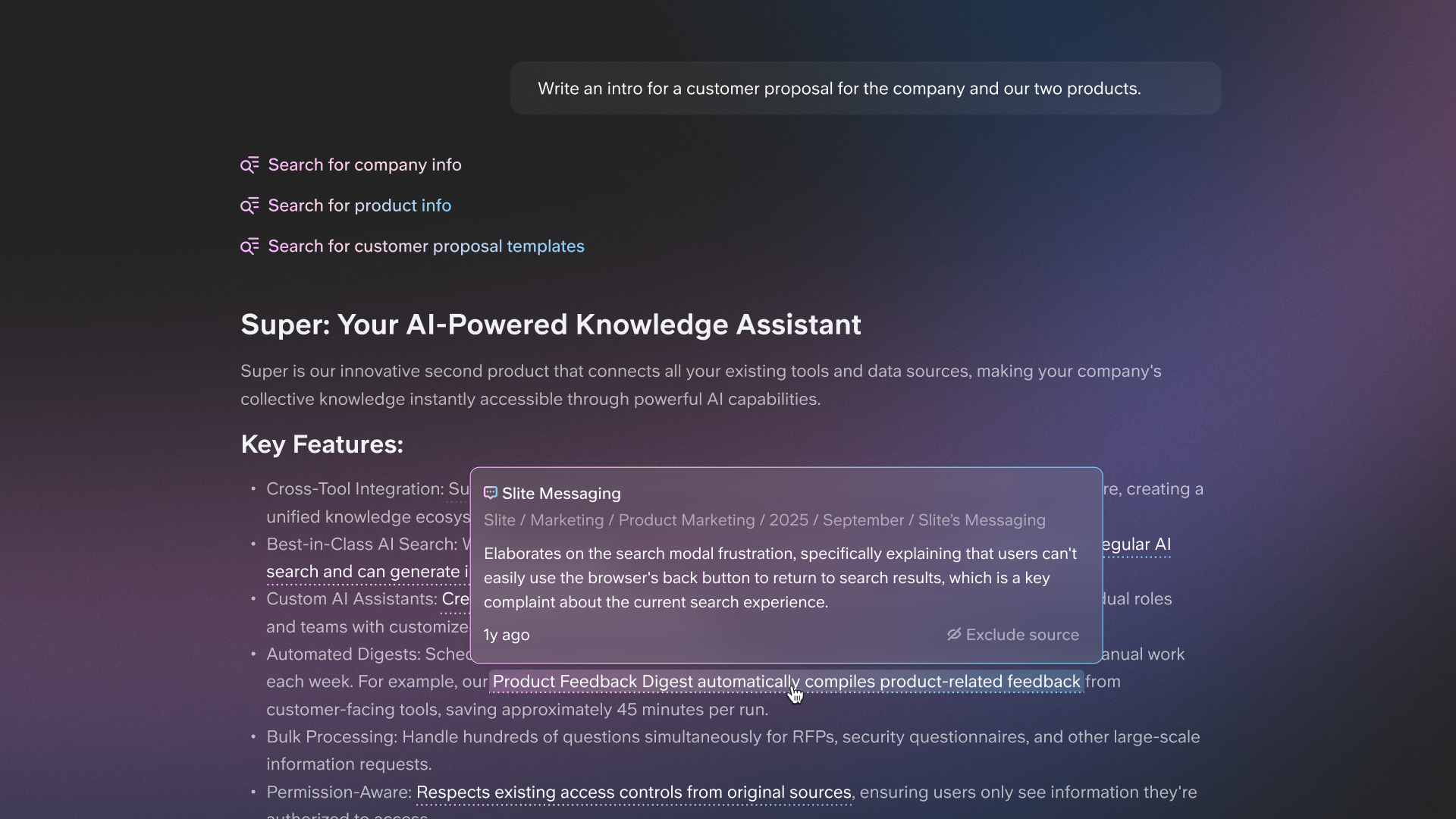
AI agents eliminate the constant flow of repetitive questions from employees or customers. Everything from how to request time off to where a certain file lives becomes instantly accessible.
Wuffes, an 80-person remote team, cut repetitive questions by 70% in 6 months. New employees stopped flooding the People team with questions about leave policies and benefits. Customer service reps stopped asking about product ingredients. Marketing team members found campaign guidelines instantly.
Searching and summarizing information
Instead of digging through Google Drive, Slack, or old threads, agents scan everything at once and give you a simple, clear summary. They search across multiple tools while respecting access controls. You only see information you're authorized to access.
Drafting documents and reports
Every company creates countless docs and loses track of them. Agents pull from your existing company knowledge to create first drafts of memos, reports, process docs, or meeting notes. You still review and polish, but you no longer start from zero.
Uscreen built an internal guide assistant that creates comprehensive documentation for new features in 30 seconds, eliminating hours of manual work.
Onboarding and training support
They help new hires get up to speed faster by answering common questions, guiding them through your processes, and surfacing documents right when needed. It keeps onboarding smooth and consistent.
Customer support triage
Agents respond to initial customer inquiries, offer quick fixes to common issues, and route more complex problems to the right teammate. Customers get faster answers and support teams get fewer interruptions.
Uscreen maintained their 97-98% customer satisfaction score while decreasing total handling time by using AI agents in Intercom for contextual customer support responses.
Data entry and processing
Agents update records, pull information from emails, clean up inputs, and move data into the right systems. It's the tedious work humans avoid and agents complete with ease.
Meeting preparation and follow-ups
Agents gather context, find relevant documents, and surface key details before a meeting so you walk in prepared. After the meeting, they summarize decisions and action items so nothing gets lost.
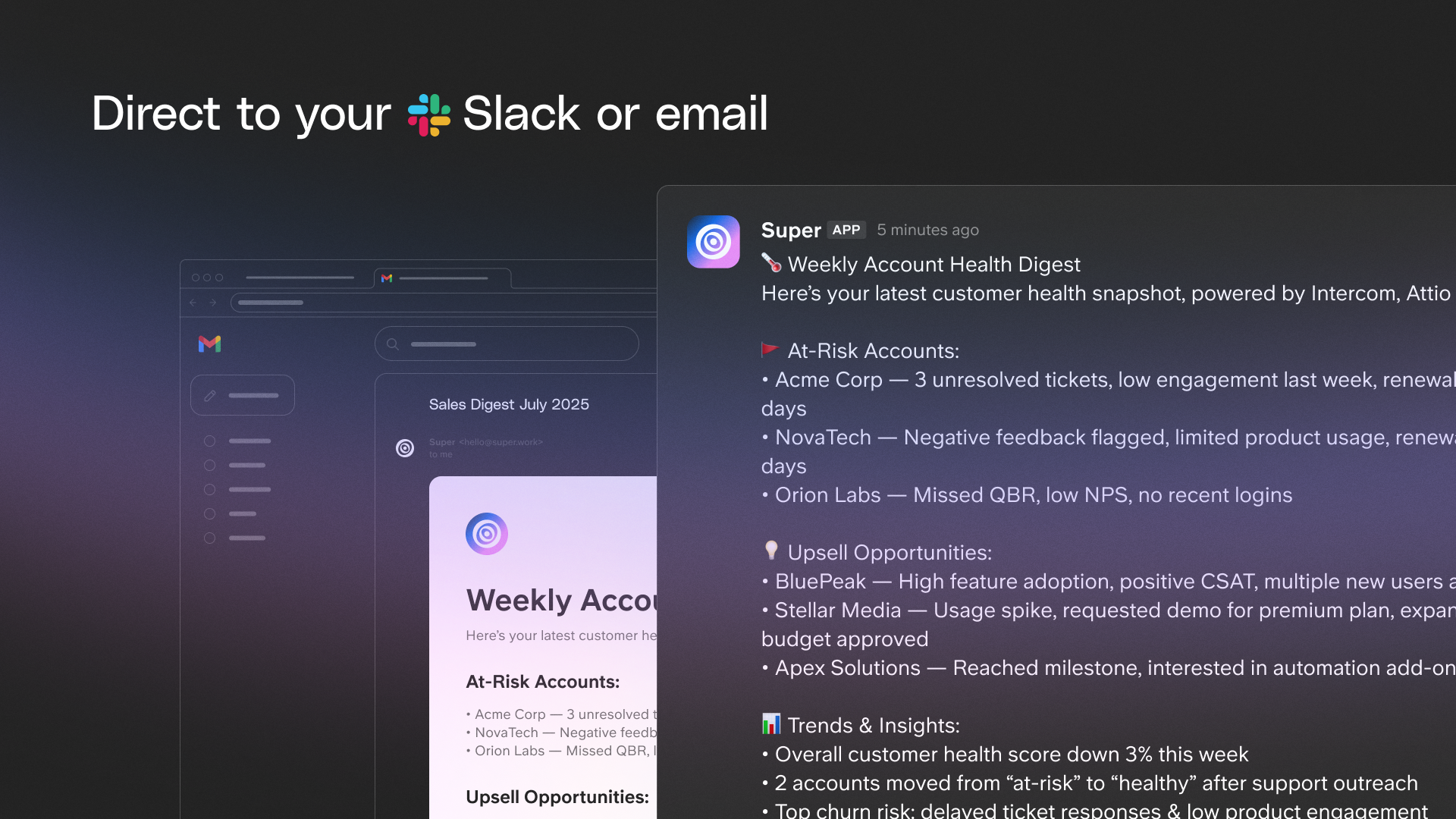
Hasan Ijaz at Wuffes saves 1-2 hours daily managing 100+ projects through automated digests that flag overdue tasks and highlight changes across their Asana workspace.
How Slite automated 40 hours of work/week using AI Agents
We don't just build AI agents—we use them to run our own business. Across marketing, sales, product, and support, our team has automated dozens of workflows that used to consume hours every week. Here's how each department turned repetitive tasks into automated processes.
Marketing
The marketing team uses Claude Code and Super-tied automations to review SEO articles at scale. Instead of manually checking every piece of content for accuracy and brand consistency, the system pulls from verified company knowledge to flag issues and suggest improvements automatically.
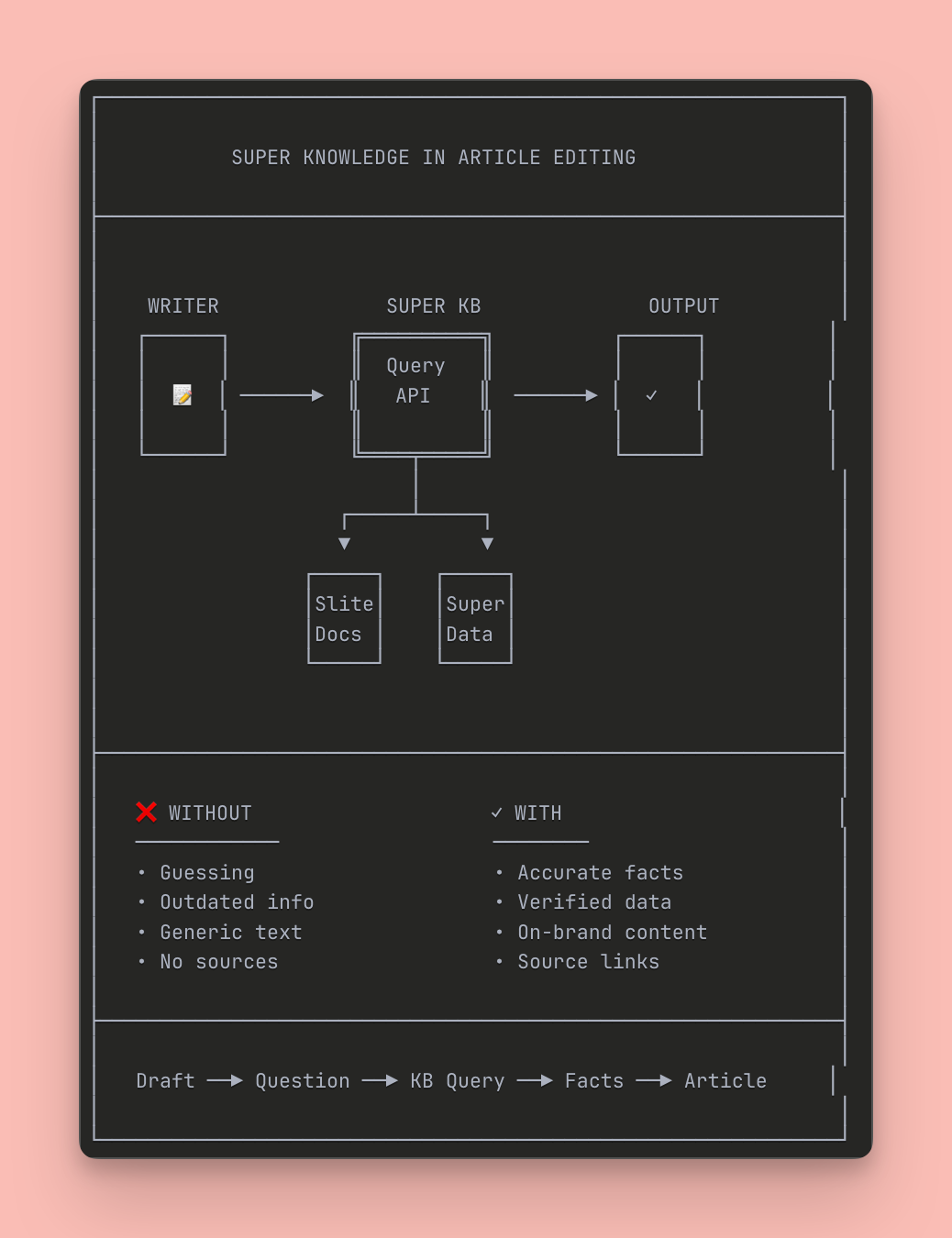
For thought leadership content, Ishaan built an agent that takes raw transcripts and adapts them to Chris' tone of voice for LinkedIn. What used to take hours of editing now happens in minutes, maintaining authenticity while scaling executive content production.
Sales
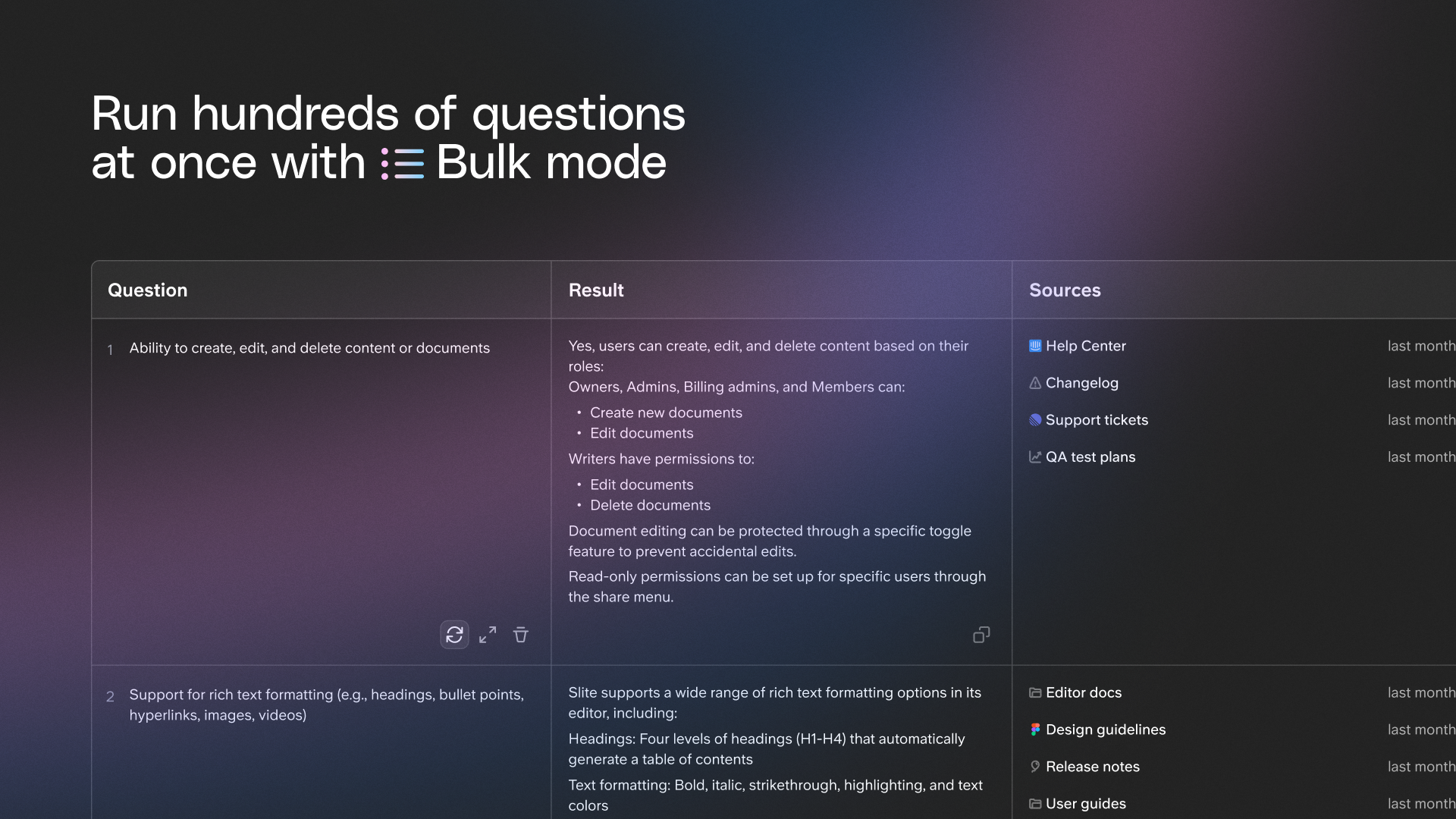
The sales team automated three critical workflows that were eating up their days. They use Super assistants and bulk mode to automate lead follow-up emails and lead research, ensuring no prospect falls through the cracks while personalizing outreach at scale.
RFP filling became dramatically faster using Super assistants. The team can now paste hundreds of questions and get accurate answers in seconds, pulling from verified company documentation instead of hunting through scattered files.
Product
Product teams use AI agents to build changelogs automatically from what's been merged, eliminating the manual work of tracking and documenting releases. They also auto-summarize product requests and trends from customer call transcripts, turning hours of listening into actionable insights in minutes.
Customer Support
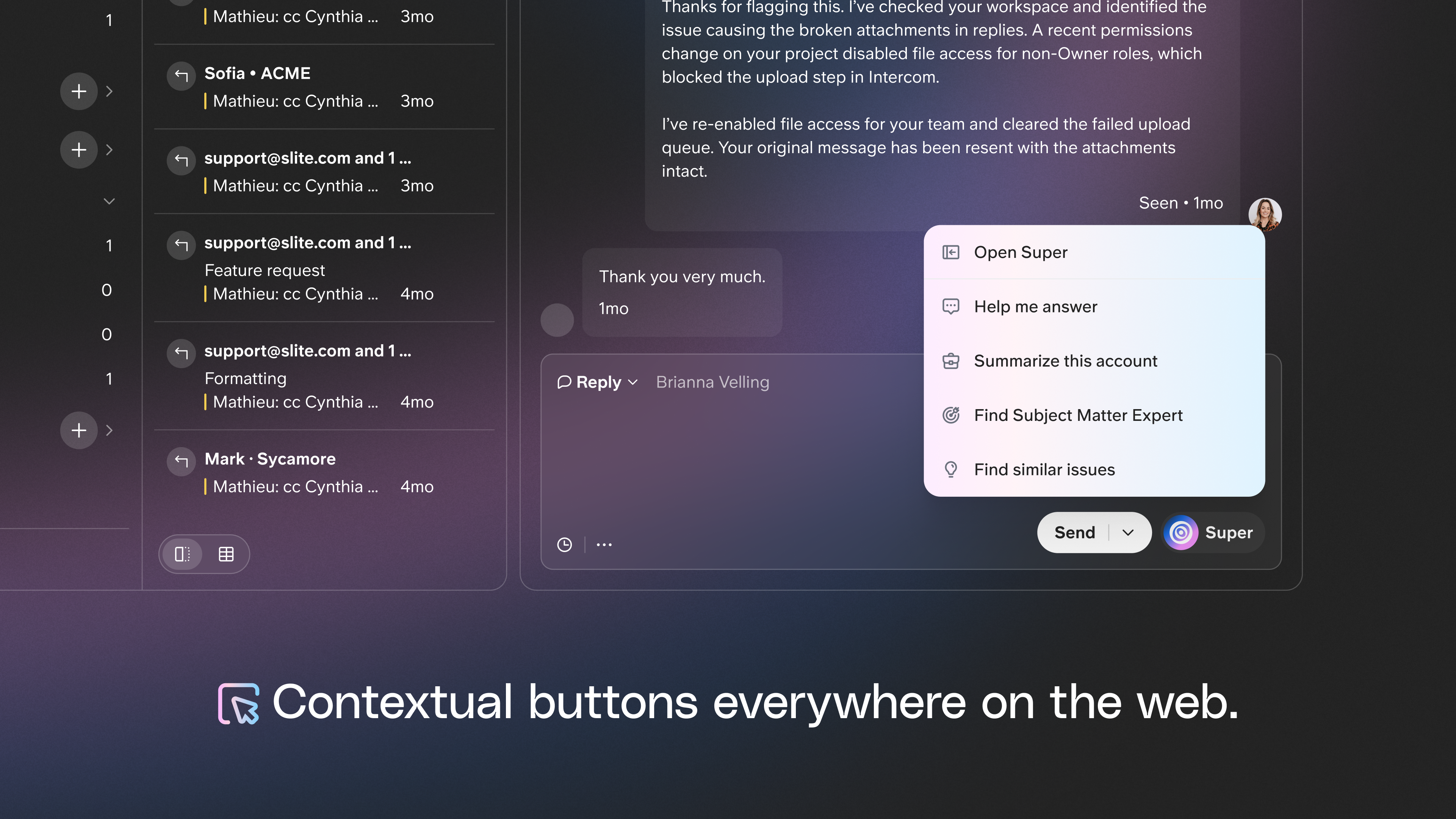
Support teams rely on the Super contextual button to instantly surface relevant information while helping customers. Instead of searching through documentation or escalating to other teams, support reps get immediate, accurate answers that respect permissions and pull from the latest verified knowledge.
They're the actual workflows our team runs - all saving us 40+ hours a week - all running autonomously across our tech stack to increase productivity of all 20+ of our teammates.
Key benefits of AI agents for business
Increased efficiency
AI agents complete the busywork that usually slows teams down. They process multiple tasks simultaneously, retrieve the right information instantly, and finish routine steps in seconds rather than hours. Your workflows move faster without anyone needing to push things along.
Agorapulse cut internal questions by 90% across their 220-person team. Product managers gained focus time instead of constantly answering repetitive questions, while customer success and sales reps found instant answers instead of searching manually.
24/7 availability
Agents operate continuously and respond in real time, regardless of time zone or workload. This creates a constant layer of support for teams and customers, keeping work moving even outside normal hours.
Scalability
As operational demands rise, agents take on more tasks without needing additional setup or training. They scale automatically because they rely on your existing data and tools, not human capacity.
Cost-effectiveness
By automating high-volume and repetitive tasks, agents reduce the need for extra headcount or outsourcing. They process data, retrieve information, and execute simple decision flows at a fraction of the cost of manual work.
Mark Weisberg at Uscreen canceled their quality assurance tool because Super eliminated the need for it, representing direct cost savings from removing redundant software.
Consistency
AI agents follow the same steps every time and rely on the information you've already approved, which means fewer mistakes and more dependable results. They deliver reliable, accurate, and on-brand responses every time.
How businesses are using AI agents today
Customer support teams
AI agents help support teams stay ahead of volume. They give instant answers to common questions, triage tickets, and route complex issues to the right human teammate. Customers get fast, consistent support, and agents free up the team to focus on higher-value conversations.
Uscreen's success managers and onboarding specialists now handle complex customer questions without escalating to support teams, thanks to AI agents giving them instant expertise.
Sales and business development
In sales, AI agents complete the early, time-consuming steps. They research prospects, draft personalized outreach emails, and help qualify leads based on predefined criteria. This keeps pipelines moving while giving reps more time to focus on real conversations and closing deals.
Agorapulse achieved a 98-99% success rate on RFP questions. They paste hundreds of questions and get all the answers in seconds using verified information. This transformed their RFP process from a time-consuming research exercise into an efficient workflow.
Human resources and people ops
People teams use agents to answer employee questions about policies, benefits, and internal processes. They also support onboarding by surfacing the right documents at the right time and can even track routine tasks like leave requests. The result is a smoother, more consistent employee experience.
IT and operations
For IT teams, agents act as a first line of support. They offer troubleshooting guidance, give access to technical documentation, and automate repetitive workflows like account setup and system checks. This reduces ticket volume and helps teams respond faster.
Product and engineering teams
Product and engineering teams rely on agents to quickly surface specs, answer technical questions from other departments, and compile draft release notes. Agents reduce context switching and help keep everyone aligned on the latest information.
Top 2 tools to build AI Agents on top of your company data
Slite + Super
For teams that want fast, reliable AI without complex setup
Answers questions using verified company knowledge. Super searches across 15+ connected tools, while Slite maintains your single source of truth with built-in verification features.
Dust
For teams that want model flexibility
Enterprise AI assistant with support for multiple models and deep integrations
How to choose an AI agent for your business
Not all AI agents are built the same. The right one depends on how your team works today and what you want to automate first. Before choosing a platform, step back and look at a few key factors:
Data sources
An AI agent is only as useful as the information it can access. Identify which systems, documents, and applications it needs to do its job well. This often includes internal docs, shared drives, project tools, and communication platforms. If an agent can't see your real work context, it won't deliver accurate or helpful results.
Integrations
A good agent should fit naturally into your existing workflows. Check whether it connects smoothly with the tools your team already uses, like Slack, your CRM, or your help desk software. The best agents work where your team already spends time, instead of forcing everyone to adopt a new interface.
Setup complexity
Some agents are quick to set up, while others require weeks of configuration and technical work. Think about how much time and expertise your team can realistically invest. If the setup feels heavy or fragile, adoption will likely stall. Simple onboarding usually leads to faster value.
Customization
Every business works a little differently. Look for an agent that lets you adjust how it behaves, what it can access, and how it responds. This could mean tailoring workflows, defining rules, or adjusting tone and permissions. The more closely the agent matches your processes, the more useful it becomes.
Security
Review how the platform handles permissions and sensitive data to ensure information remains protected. Key features to look for include permission-aware search that respects original access controls, SOC 2 Type II certification, and data encryption with EU-based storage. These safeguards make it safer to roll out an agent across teams without compromising trust.
Budget and ROI
Yes, we know this is a no-brainer but there's a wide variety of tools out there with different pricing models too.
Consider per-user or per-agent pricing, and factor in the time saved across your team. An effective agent often pays for itself by reducing interruptions, speeding up workflows, and cutting down repetitive work.
How to get started with AI agents
Getting value from AI agents doesn't require a massive transformation. The most successful teams start small, focus on real problems, and build from there.
1. Identify your highest-impact repetitive tasks
Begin by listing the recurring questions and tasks. These are often hiding in plain sight. Look through Slack channels, support tickets, onboarding questions, and meeting prep. If the same answers are being typed repeatedly or the same information is being searched for every week, that's a strong signal the task must be automated.
2. Audit and organize your company knowledge
AI agents are only as good as the information they can access. Before rolling one out, take time to clean up your knowledge base.
Remove outdated documents, fill in missing explanations, and verify that your most important information is accurate and easy to understand. Clear, well-structured documentation gives agents a solid foundation and leads to more reliable answers.
Wuffes discovered their documentation had inconsistencies across Notion, Google Drive, and Asana when they started using AI agents. This led to a massive documentation cleanup, resulting in aligned information across all platforms.
Use Slite's verification system to mark documents as verified and set review reminders, so content stays fresh over time. You can also rely on the Knowledge Management Panel to centrally track document status without switching between multiple screens.
3. Choose an AI agent platform
Use the criteria you've already defined to select a platform that fits your needs. For most teams, it's best to start with a tool that requires minimal setup and works with your existing stack. This makes it easier to test an agent's value without committing to a long or complex implementation.
And of course, you know which one we'd recommend!
4. Connect your data sources
Once you've chosen a platform, connect it to the tools your team uses every day. The more relevant context the agent has, the more helpful it becomes. Ensure access settings match your existing permissions to keep information secure.
5. Test with a pilot team
Roll the agent out to a small group that represents how the wider team works. Encourage them to use it for real tasks and ask for honest feedback. Pay attention to where the agent is helpful, where it struggles, and which questions it can't answer yet. This phase is about learning and fine-tuning, not perfection.
For instance, you can create a support agent to identify how quickly AI agents can resolve queries on the website chat and check if it actually saves time for the support team.
Agorapulse initially required teams to share responses in dedicated Slack channels for peer review. Within months, this manual oversight became unnecessary because corrections made in Slack automatically improved future responses.
6. Measure results and expand
Track simple metrics like time saved, number of questions answered, and how often people use the agent. Combine this data with qualitative feedback from the pilot team.
If the results are positive, gradually expand access to other teams and use cases. Over time, the agent becomes more embedded in daily work and delivers increasing value.
Use Slite's Ask Insights to identify gaps in your knowledge base, see which questions the AI couldn't answer, and review answers that people flagged as incorrect. Combining these insights with usage data and team feedback helps you fine-tune both your documentation and the AI agent.
Once the pilot proves successful, you can gradually expand the rollout to other teams and workflows, maximizing impact across the organization.
Is your data safe with AI agents?
Security and trust are often the first concerns when introducing AI agents into daily work. The good news is that modern, enterprise-ready agents are designed with data protection in mind, as long as you choose the right platform.
Data privacy and access controls
Permissions are critical. A reliable AI agent should access and share only information a user is already authorized to see. That means respecting existing roles, access rules, and folder permissions across your tools. When permission-aware access is in place, agents don't create new security risks. They simply make authorized information easier to find.
Grounding responses in verified sources
AI agents should never feel like a black box. The best ones clearly indicate where their answers come from, allowing users to click through to the original documents. This makes it easy to verify accuracy and builds trust over time. Strong documentation leads to better answers.
Slite's verification system with expiration notifications ensures content remains current, and verified documents act as a seal of approval that your team can trust. When AI agents rely on verified knowledge, answers are more reliable, consistent, and aligned with your company's standards.
Audit trails and transparency
For accountability, look for platforms that offer clear audit trails. This includes visibility into what information the agent accessed, which tools it queried, and how it formed its response. Transparency like this helps teams understand agent behavior, troubleshoot issues, and meet internal governance requirements.
Enterprise compliance
Finally, make sure the platform meets established security and data protection standards. Compliance with frameworks like SOC 2 and GDPR shows that the provider follows strict processes around data handling, storage, and privacy. These certifications are essential for scaling AI agents safely across an organization.
Why organized knowledge makes AI agents more effective
When documentation is messy, outdated, or spread across too many places, agents struggle to give accurate answers.
However, when everything is structured, agents spend less time guessing and more time being genuinely helpful.
Slite maintains your single source of truth with document verification, automated owner notifications, and AI-suggested actions to keep documentation clean. When paired with an AI agent, this creates a workflow where your agent pulls from authoritative, verified knowledge.
Try the Knowledge Suite for free today

Janhavi Nagarhalli
Janhavi Nagarhalli is a product-led Content Marketer at Factors AI. She writers about the creator economy and personal branding on Linkedin.
¿Listo para potenciar tu flujo de trabajo?
Conecta tus herramientas y empieza a obtener respuestas al instante.
Llevamos creando soluciones para compartir conocimiento y mejorar el trabajo desde 2016.